Installed inside your Odoo · Your own Odoo permissions · Zero external server
Claude connected to Odoo.
A simple module that brings Odoo directly into your favorite AI tool. Uses the Odoo user's own rights, enforced automatically. Simple — and secure.
- On-Premise & Odoo.sh (Odoo 18 & 19)
- Installed in 2 minutes from the Odoo Apps
Which invoices are overdue for the Paris subsidiary?
3 overdue invoices for the Paris subsidiary — €24,980 in total.
| Reference | Amount | Status |
|---|---|---|
| INV/2026/0184 | 12 400 € | retard 8j |
| INV/2026/0191 | 7 180 € | 28/06 |
| INV/2026/0203 | 5 400 € | 02/07 |
Works with
ClaudeChatGPTGeminiMistralCopilotSwitch AI client whenever you want — the module doesn't move.
Pricing
Two modules. One choice: how much governance you need.
prices before tax · Pro billed per Odoo instance
Cledoo MCP
The base module: native Odoo ACLs, built-in OAuth 2.1 — one of the most complete MCP modules for Odoo, free.
- Built-in OAuth 2.1: connect Claude by pasting a URL, no key to copy
- Native Odoo API keys: user rights are always enforced & used
- 17 MCP tools (read + write ORM)
- Odoo multi-company respected
- Updates included
Cledoo MCP Pro
The governance layer: who the AI can act as, what it can touch, and a trace of everything it did.
- Everything in Cledoo MCP, plus:
- Read-only mode: block every write tool for all AI clients at once — the global kill-switch
- Per-user policies: allow or deny exactly what each user's AI can access
- Data privacy masking: personal data hidden automatically, even in exports
- Human-confirmed writes: risky changes wait for your approval
- Outbound guard: stops the AI sending emails or messages on its own
- Interactive AI views: Odoo dashboards rendered right inside the chat
- Exportable audit log + alerts on suspicious activity
- Priority support
Your baseline security is Odoo's own — it never depends on a subscription.
What you can do with — and without — Pro
Both modules connect your AI to Odoo with each user's native Odoo rights. Pro adds a governance layer: you decide what the AI can touch, and you keep a trace of everything.
| Cledoo MCP | Cledoo MCP Pro | |
|---|---|---|
| Connect Claude (or any MCP client) to your Odoo | ||
| Read and write in Odoo with the user's rights (native ACLs) | ||
| Built-in OAuth 2.1 & native Odoo API keys | ||
| Odoo multi-company respected | ||
| Global read-only kill-switch (block every write at once) | ||
| Per-user policies: allow or deny exactly each action | ||
| Personal data masking, even in exports | ||
| Risky writes wait for human approval | ||
| Outbound guard: the AI never sends emails or messages on its own | ||
| Exportable audit log + alerts on suspicious activity | ||
| Interactive AI views (Odoo dashboards inside the chat) | ||
| Priority support |
Demo
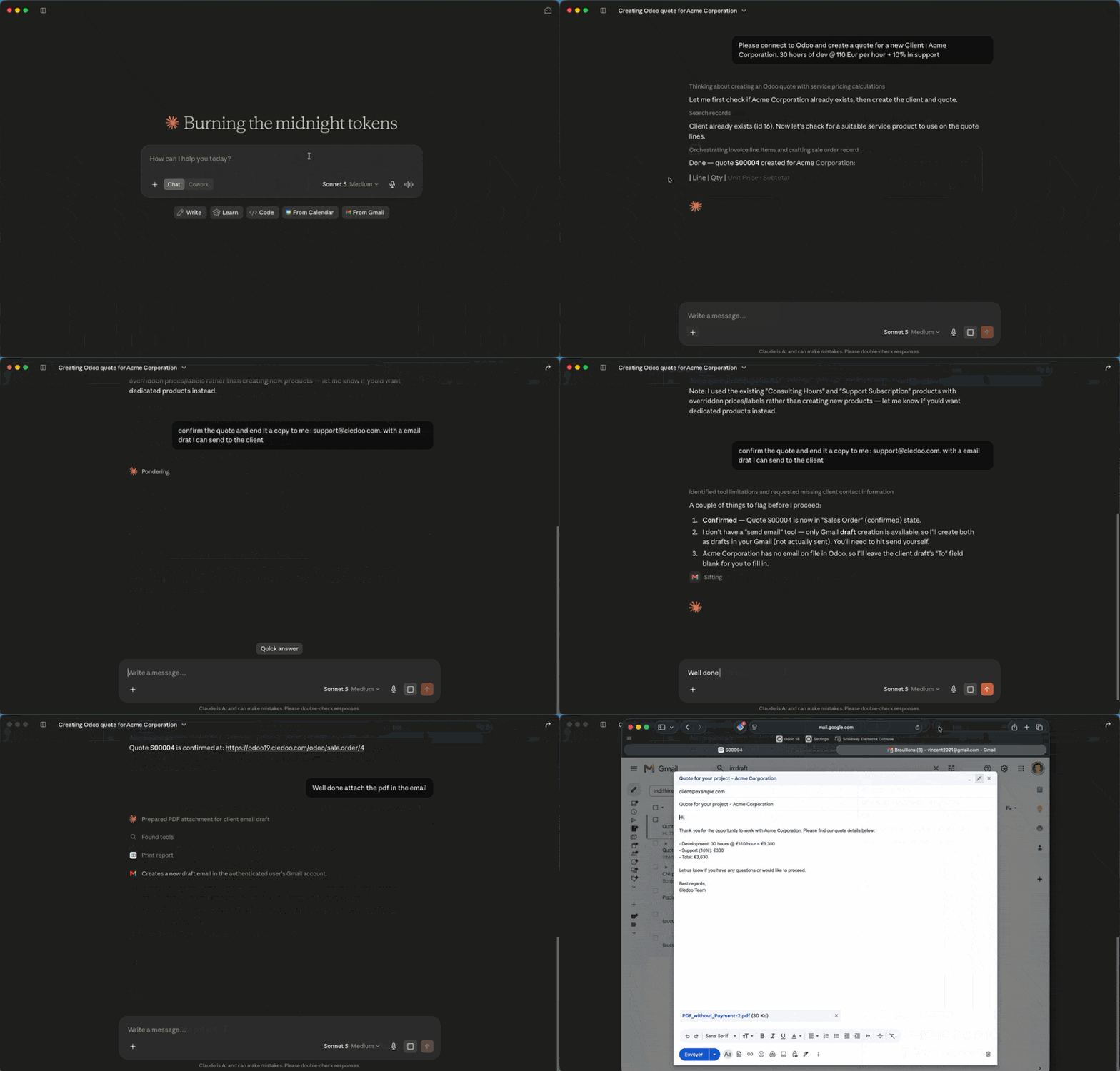
Claude, connected to your Odoo — for real.
A real session: Claude queries an Odoo instance through Cledoo MCP and answers with the data, within the signed-in user's scope.
Concretely
What actually changes.
It runs inside your Odoo
Cledoo MCP is a module like any other: installed in your instance, it adds no server, no account, no external dependency.
Your Odoo permissions, automatically
Every user acts as their own Odoo account. ACLs and record rules apply with no extra configuration.
Nothing leaves your premises
No data ever transits through a Cledoo server. Everything stays on your instance, from the first byte to the last.
Use cases
What your teams do without opening Odoo.
Sales, production, leadership and IT ask real questions and take real actions in plain language, straight from Claude. Cledoo MCP runs each one in Odoo within that user's own scope — reading directly, writing according to their rights. No dashboard to build, no Odoo screen to open.
Sales
« Which opportunities > €50k have had no activity for 14 days? »
« Summarize the last 3 exchanges with Acme and log them on the deal. »
Production
« Which manufacturing orders risk missing their delivery this week? »
« Which components have dropped below safety stock? »
Leadership
« Product X overview: this month's sales, production, open orders, lead times. »
« Compare margin per subsidiary over the quarter. »
IT
« Which users haven't logged in for 30 days? »
« Export the AI access log for the last 7 days. »
Getting started
Three steps, and you're live.
Install the module
From the Odoo Apps Store (Cledoo MCP, free) or by uploading the module file to your On-Premise / Odoo.sh instance.
Activate and connect
A toggle in Settings > MCP. Generate an Odoo API key, or use the built-in OAuth 2.1 flow to connect claude.ai in one click.
Your teams use their AI
Claude, or any MCP client, as usual. Each person acts with their own Odoo account and rights.
Security
Odoo's own security. Nothing more, nothing less.
The AI sees and does exactly what the connected Odoo user can — no more, no less. Cledoo MCP authenticates every caller as a real Odoo user and runs each call under their ACLs and record rules; it adds no separate rules engine, and no data ever leaves your instance. Advanced governance — masking, audit, confirmed writes — is what Cledoo MCP Pro adds.
No third-party server
The module runs inside your Odoo instance. No request, no data ever transits through a Cledoo server.
Native Odoo permissions
Every MCP call runs with the connected user's ACLs and record rules — exactly what they can see and do in the Odoo UI.
Writes unconstrained beyond ACLs (base module)
On Cledoo MCP, create/update/delete follow only the user's Odoo rights — like any direct ORM access.
Advanced governance with Pro
A global read-only kill-switch, data privacy masking, role-based policies, human-confirmed writes and an exportable audit log.
Auditable code
The module and how it works are documented and reviewable — no black box between Claude and your Odoo.
FAQ
Frequently asked questions
- What is Cledoo MCP?
- Cledoo MCP is a native Odoo module that turns your instance into an MCP server. Claude — or any MCP client — connects to it directly and acts with the connected user's own Odoo permissions. No external server, no separate service account.
- Which AI assistants does it work with?
- Any client that speaks the Model Context Protocol: Claude (claude.ai and Claude Desktop) today, with ChatGPT, Gemini, Mistral and Copilot as they add MCP support. You connect with a native Odoo API key or the module's built-in OAuth 2.1 flow — no key to copy.
- Do my data leave my Odoo instance?
- No. The MCP server runs inside your own Odoo — there is no Cledoo relay server in between. Only the records your AI client explicitly requests are returned to it, exactly as if the connected user had opened them in Odoo.
- Is it compatible with Odoo Online (SaaS)?
- No. Cledoo MCP requires installing a custom module, which is only possible on Odoo On-Premise or Odoo.sh — not on Odoo Online (SaaS). Supported versions: Odoo 18 and 19.
- How do I install it?
- Install Cledoo MCP free from the Odoo Apps Store or upload the module file to your instance, then flip it on under Settings > MCP. Setup takes about two minutes and there is nothing else to host.
- What can the AI actually do — can it change or delete records?
- The AI acts exactly like the connected Odoo user: it can read, and it can create, update and delete — but only within that user's ACLs and record rules, across 17 MCP tools. To require human approval on risky writes, mask sensitive fields, or stop the AI sending emails on its own, add Cledoo MCP Pro.
- What does Cledoo MCP Pro add?
- A governance layer on top of the base module: per-user policies, sensitive-field masking (even in exports), human-confirmed writes, an outbound guard that blocks the AI from sending emails or messages on its own, and an exportable audit log with alerts.
- How much does it cost?
- Cledoo MCP is free, on the Odoo Apps Store. Cledoo MCP Pro is €189, a one-time purchase per Odoo version. Your baseline security is Odoo's own and never depends on a subscription.